
This blog addresses the options available to better manage the conflicting dependency versions and discuss a standard and consistent way to manage the dependencies using maven. Basic maven knowledge is assumed.
Problem Statement
Developers usually face lot of problems to resolve the dependency version conflicts. Maven has became the goto tool to handle dependencies management for java applications. It is very easy to declare the dependencies with specific version in Maven POM files.
But even after that conflict resolution specially in case of transitive dependency can be quite complex. In large projects, it is important to centrally manage and reuse the most relevant dependency versions. This approach ensures sub projects don’t face the same challenges. Let’s first briefly understand how maven resolves versions.
How Maven resolves dependency versions
Dependencies can be declared in a direct way or a transitive way. When maven loads all the relevant dependencies with correct version it draws a tree of direct and transitive dependencies.
In this image the first level are all the direct dependencies occurring in the order declared in the pom.xml. The next level is a simple view of couple of dependencies referred by 1st level dependency.

Maven works on the principle of short path and first come called as “Nearest Definition” or “Dependency Mediation” to resolve the conflicting version. In this example the dependencies nearest to the root will be picked. This is the breadth first traversal of a tree. In the image, the highlighted ones will be picked. You can observe that potential version conflicts will happen for the slf4j-api version.
As the project grows and adds lots of transitive dependency one has to painstakingly put up the correct versions in the pom. To resolve issues, you need to define it in pom explicitly or exclude from some entries. There are many ways to define the version in the pom but what is desired is a standard and centralized way to manage the dependencies so that it can be reused.
This is more evident in a multi module project or multiple applications related to single group where you want to manage with consistent dependencies version.
Possible Solutions
There may be various ways to solve this problem but I consider following two options as the most simple and relevant one. Both the options enable reusability by the age old principle i.e. inherit or include (composition).
Manage dependencies in Parent pom
Maven allows project / submodules pom file to inherit the parent pom defined at the root level. Its possible to have external dependencies’ pom as the parent pom as well.
Example; Here is a parent-pom which is declaring dependencies for spring-data, spring-security in dependencyManagement (as a reference) and spring-core to be included. Please notice the difference between dependencyManagement tag and dependencies tag. When you use the DependencyManagement tag you are just creating a reference while the dependencies is for actually importing.
Parent-pom
    <groupId>com.demo</groupId>
    <artifactId>parent-pom</artifactId>
    <version>1.0.0</version>
    <packaging>pom</packaging>

    <dependencyManagement>
        <dependencies>
            <dependency>
                <groupId>org.springframework</groupId>
                <artifactId>spring-core</artifactId>
                <version>5.3.25</version>
            </dependency>
            <dependency>
                <groupId>org.springframework.data</groupId>
                <artifactId>spring-data-jpa</artifactId>
                <version>2.7.10</version>
            </dependency>
            <dependency>
                <groupId>org.springframework.security</groupId>
                <artifactId>spring-security-core</artifactId>
                <version>5.8.8</version>
            </dependency>
        </dependencies>
    </dependencyManagement>
    <dependencies>
        <dependency>
            <groupId>org.springframework</groupId>
            <artifactId>spring-core</artifactId>
        </dependency>
    </dependencies>
project's pom inheriting the parent-pom

    <parent>
        <groupId>com.demo</groupId>
        <artifactId>parent-pom</artifactId>
        <version>1.0.0</version>
    </parent>
    <artifactId>demo</artifactId>
    <dependencies>
        <dependency>
            <groupId>org.springframework.data</groupId>
            <artifactId>spring-data-jpa</artifactId>
        </dependency>
    </dependencies>
Developers can define dependencies with the correct version or just define the version as a variable in the parent pom file. The sub modules or sub projects can override them in their project specific pom file. Yes the “Nearest definition” applies and the child pom entries will override the parent pom’s entries.
This for sure solves the problem but just like a single inheritance you can only define a single parent pom file. Your project can’t refer to multiple pom files per concrete dependency set like., one for Spring, one for DB drivers etc. This impacts when you want to inherit multiple internal pom files. Just imagine you have inherited from springboot as a parent.
<parent>
   <groupId>org.springframework.boot</groupId>
   <artifactId>spring-boot-starter-parent</artifactId>
   <version>2.0.2.RELEASE</version>

</parent>
Parent-pom approach solves the problem but at cost of readability. You may end up having a bulky parent pom file with a long list of dependencies or variables defined. Also someone has to very carefully sort out version clashes although in a single file or central place.
Another option is to have a modularize approach enabled by the BOM (Bill of Materials) files.
BOM — Bill of Materials
BOM is a special kind of POM file only which are created for the sole purpose of centrally managing the dependencies and their version with the aim to modularize the dependencies into multiple units. BOM files are more like a lookup file. It doesn’t tell you what all dependencies you will need. It just sort out the versions of those dependencies as a unit.
Example like., bom of the spring rather than you solving all linked versions it will do it for you. Here we have included bom files of Spring boot and its dependencies, hibernate and rabbitMq. We didn’t declare all the jars in dependencyManagement. Again dependencyManagement plays the same role that it only declares and not include the dependencies.
--parent pom with bom files of spring, hibernate and rabbitMq
<groupId>com.demo</groupId>
    <artifactId>parent-pom</artifactId>
    <version>1.0.0</version>
    <packaging>pom</packaging>

    <dependencyManagement>
        <dependencies>
            <dependency>
                <groupId>org.springframework.boot</groupId>
                <artifactId>spring-boot-dependencies</artifactId>
                <version>2.7.10</version>
                <type>pom</type>
                <scope>import</scope>
            </dependency>
            <dependency>
                <groupId>org.hibernate</groupId>
                <artifactId>hibernate-bom</artifactId>
                <version>5.6.15.Final</version>
                <type>pom</type>
                <scope>import</scope>
            </dependency>
            <dependency>
                <groupId>com.rabbitmq</groupId>
                <artifactId>amqp-client</artifactId>
                <version>5.13.0</version>
                <type>pom</type>
                <scope>import</scope>
            </dependency>
        </dependencies>
    </dependencyManagement>
Ofcourse you can override version in your project’s pom and again the nearest definition principle will apply. This brings lot of advantages. It allows you to inject multiple bom files in the project i.e., one for spring, one for internal projects etc. Developers can have organization specific parent pom inherited and external dependencies included as “Dependency Management”. This is moving to modular poms from monolithic ones. On top of it you can have multiple version of the bom file which allows fair bit of independence to move from one version to another without impacting others. It creates an abstraction for all transitive dependencies and you use them as a unit with assurance that under the hood all version conflicts have been resolved effectively.
It still doesn’t solve all the problems. You will still have version conflicts lets., say when you include multiple bom files and each referring to same jar but different version. Such issues should be very less now as inside a bom such issues are already taken care of. So issues will happen but probability is far less.
Concluding Remarks
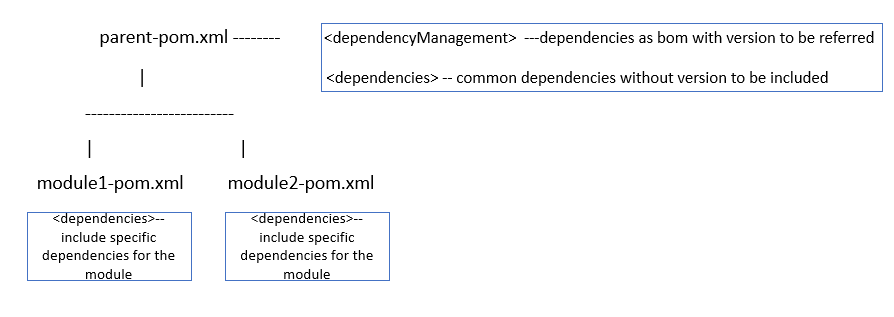
It makes sense to include bom files for external dependencies if they are made available. Even the internal dependencies can be created a bom project. In a multi module project, the best strategy would be to declare what all versions can be used in the <dependencyManagement> section of the parent-pom. This is just the declaration and it will not pull the dependencies in your project. To pull the common dependencies define them into your parent-pom under dependencies section. Lastly, whatever are the specific dependencies only applicable to your modules should be declared in your module/project’s pom. A quick illustration :
 Caffe Big