Parent POM and BOM: Simplifying Dependency Management and Version Conflict Resolution

This blog addresses the options available to better manage the conflicting dependency versions and discuss a standard and consistent way to manage the dependencies using maven. Basic maven knowledge is assumed.

Problem Statement

Developers usually face lot of problems to resolve the dependency version conflicts. Maven has became the goto tool to handle dependencies management for java applications. It is very easy to declare the dependencies with specific version in Maven POM files.

But even after that conflict resolution specially in case of transitive dependency can be quite complex. In large projects, it is important to centrally manage and reuse the most relevant dependency versions. This approach ensures sub projects don’t face the same challenges. Let’s first briefly understand how maven resolves versions.

How Maven resolves dependency versions

Dependencies can be declared in a direct way or a transitive way. When maven loads all the relevant dependencies with correct version it draws a tree of direct and transitive dependencies.

In this image the first level are all the direct dependencies occurring in the order declared in the pom.xml. The next level is a simple view of couple of dependencies referred by 1st level dependency.

Maven works on the principle of short path and first come called as “Nearest Definition” or “Dependency Mediation” to resolve the conflicting version. In this example the dependencies nearest to the root will be picked. This is the breadth first traversal of a tree. In the image, the highlighted ones will be picked. You can observe that potential version conflicts will happen for the slf4j-api version.

As the project grows and adds lots of transitive dependency one has to painstakingly put up the correct versions in the pom. To resolve issues, you need to define it in pom explicitly or exclude from some entries. There are many ways to define the version in the pom but what is desired is a standard and centralized way to manage the dependencies so that it can be reused.

This is more evident in a multi module project or multiple applications related to single group where you want to manage with consistent dependencies version.

Possible Solutions

There may be various ways to solve this problem but I consider following two options as the most simple and relevant one. Both the options enable reusability by the age old principle i.e. inherit or include (composition).

Manage dependencies in Parent pom

Maven allows project / submodules pom file to inherit the parent pom defined at the root level. Its possible to have external dependencies’ pom as the parent pom as well.

Example; Here is a parent-pom which is declaring dependencies for spring-data, spring-security in dependencyManagement (as a reference) and spring-core to be included. Please notice the difference between dependencyManagement tag and dependencies tag. When you use the DependencyManagement tag you are just creating a reference while the dependencies is for actually importing.

Parent-pom
<groupId>com.demo</groupId>
<artifactId>parent-pom</artifactId>
<version>1.0.0</version>
<packaging>pom</packaging>

<dependencyManagement>
<dependencies>
<dependency>
<groupId>org.springframework</groupId>
<artifactId>spring-core</artifactId>
<version>5.3.25</version>
</dependency>
<dependency>
<groupId>org.springframework.data</groupId>
<artifactId>spring-data-jpa</artifactId>
<version>2.7.10</version>
</dependency>
<dependency>
<groupId>org.springframework.security</groupId>
<artifactId>spring-security-core</artifactId>
<version>5.8.8</version>
</dependency>
</dependencies>
</dependencyManagement>
<dependencies>
<dependency>
<groupId>org.springframework</groupId>
<artifactId>spring-core</artifactId>
</dependency>

</dependencies>

project's pom inheriting the parent-pom

<parent>
<groupId>com.demo</groupId>
<artifactId>parent-pom</artifactId>
<version>1.0.0</version>
</parent>
<artifactId>demo</artifactId>
<dependencies>
<dependency>
<groupId>org.springframework.data</groupId>
<artifactId>spring-data-jpa</artifactId>
</dependency>
</dependencies>

Developers can define dependencies with the correct version or just define the version as a variable in the parent pom file. The sub modules or sub projects can override them in their project specific pom file. Yes the “Nearest definition” applies and the child pom entries will override the parent pom’s entries.

This for sure solves the problem but just like a single inheritance you can only define a single parent pom file. Your project can’t refer to multiple pom files per concrete dependency set like., one for Spring, one for DB drivers etc. This impacts when you want to inherit multiple internal pom files. Just imagine you have inherited from springboot as a parent.

<parent>
<groupId>org.springframework.boot</groupId>
<artifactId>spring-boot-starter-parent</artifactId>
<version>2.0.2.RELEASE</version>

</parent>

Parent-pom approach solves the problem but at cost of readability. You may end up having a bulky parent pom file with a long list of dependencies or variables defined. Also someone has to very carefully sort out version clashes although in a single file or central place.

Another option is to have a modularize approach enabled by the BOM (Bill of Materials) files.

BOM — Bill of Materials

BOM is a special kind of POM file only which are created for the sole purpose of centrally managing the dependencies and their version with the aim to modularize the dependencies into multiple units. BOM files are more like a lookup file. It doesn’t tell you what all dependencies you will need. It just sort out the versions of those dependencies as a unit.

Example like., bom of the spring rather than you solving all linked versions it will do it for you. Here we have included bom files of Spring boot and its dependencies, hibernate and rabbitMq. We didn’t declare all the jars in dependencyManagement. Again dependencyManagement plays the same role that it only declares and not include the dependencies.

--parent pom with bom files of spring, hibernate and rabbitMq   
<groupId>com.demo</groupId>
<artifactId>parent-pom</artifactId>
<version>1.0.0</version>
<packaging>pom</packaging>

<dependencyManagement>
<dependencies>
<dependency>
<groupId>org.springframework.boot</groupId>
<artifactId>spring-boot-dependencies</artifactId>
<version>2.7.10</version>
<type>pom</type>
<scope>import</scope>
</dependency>
<dependency>
<groupId>org.hibernate</groupId>
<artifactId>hibernate-bom</artifactId>
<version>5.6.15.Final</version>
<type>pom</type>
<scope>import</scope>
</dependency>
<dependency>
<groupId>com.rabbitmq</groupId>
<artifactId>amqp-client</artifactId>
<version>5.13.0</version>
<type>pom</type>
<scope>import</scope>
</dependency>
</dependencies>
</dependencyManagement>

Ofcourse you can override version in your project’s pom and again the nearest definition principle will apply. This brings lot of advantages. It allows you to inject multiple bom files in the project i.e., one for spring, one for internal projects etc. Developers can have organization specific parent pom inherited and external dependencies included as “Dependency Management”. This is moving to modular poms from monolithic ones. On top of it you can have multiple version of the bom file which allows fair bit of independence to move from one version to another without impacting others. It creates an abstraction for all transitive dependencies and you use them as a unit with assurance that under the hood all version conflicts have been resolved effectively.

It still doesn’t solve all the problems. You will still have version conflicts lets., say when you include multiple bom files and each referring to same jar but different version. Such issues should be very less now as inside a bom such issues are already taken care of. So issues will happen but probability is far less.

Concluding Remarks

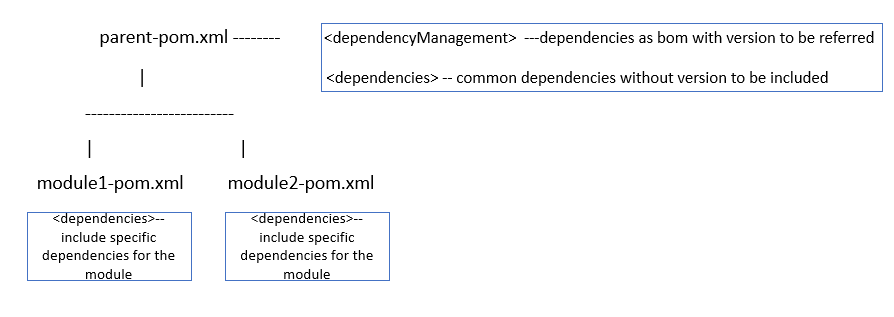
It makes sense to include bom files for external dependencies if they are made available. Even the internal dependencies can be created a bom project. In a multi module project, the best strategy would be to declare what all versions can be used in the <dependencyManagement> section of the parent-pom. This is just the declaration and it will not pull the dependencies in your project. To pull the common dependencies define them into your parent-pom under dependencies section. Lastly, whatever are the specific dependencies only applicable to your modules should be declared in your module/project’s pom. A quick illustration :
Unit Testing Hadoop Map Reduce Jobs

In this post we would discuss various strategies to test and validate the map reduce jobs for hadoop.

Being a parallel programming framework it becomes a bit difficult to properly unit test and validate map reduce jobs from a developer’s scope let alone the Test Driven Development.

We will focus on various ways to do unit testing for map reduce jobs.

In the post we will discuss how to validate map reduce output using :
1. JUnit framework to test mappers and reducers using mocking (Mockito)
2. MRUnit framework to completely test the flow but in a single JVM.
3. mini-HDFS and a mini-MapReduce cluster to perform Integration Testing.
4. Hadoop Inbuilt Counters
5. LocalJobRunner to debug jobs using local filesystem.

1. JUnit framework to test mappers and reducers using mocking (Mockito)

Junit tests can be easily executed for Map Reduce jobs provided we test map function and reduce function in isolation. We can also test Driver function but with SpringData -Hadoop[http://www.springsource.org/spring-data/hadoop] project, driver configuration can be moved out of code. Using springData beans can further ease testing. If we execute the map and reduce function in isolation then there is dependency only on context object. We can easily clone context object using Mockito[http://code.google.com/p/mockito/].

All the tests can be executed from IDE. We just need to hadoop distribution jars and Mockito and junit jars in classpath.

Example to test the WordCount Mapper. It works with hadoop 1.0.3 and junit 4.1. We have mocked the context class.

public class WordCountTest {

	private TokenizerMapper mapper;
	private Context context;
	final Map<Object,Object> test = new HashMap();
	final AtomicInteger counter = new AtomicInteger(0);

	@Before
	public void setUp() throws Exception {
		mapper = new TokenizerMapper();
		context = mock(Context.class);
	}

	@Test
	public void testMethod() throws IOException, InterruptedException {

		doAnswer(new Answer<Object>() {
			public Object answer(InvocationOnMock invocation) {
				Object[] args = invocation.getArguments();
				test.put(args[0].toString(), args[1].toString());
				counter.incrementAndGet();
				return "called with arguments: " + args;
			}
		}).when(context).write(any(Text.class),any(IntWritable.class));

		mapper.map(new LongWritable(1L), new Text("counter counter counter" +
		" test test test"), context);
		Map<String,String> actualMap = new HashMap<String, String>();
		actualMap.put("counter", "1");
		actualMap.put("test", "1");
		assertEquals(6,counter.get());
		assertEquals(actualMap, test);
	}
}

On the similiar lines reducer can be tested.

Key to use this strategy effectively is to refactor the code properly.Business logic related code should be moved out of map and reduce methods. It helps in effectively testing the business logic. We should also think about moving the mapper and reducer is separate classes. This follows strategy pattern and better reusability.

Junit tests with Mockito are very easy to use. Only problem is that we can not test the solution as a whole. It at max certifies the business logic. We should consider other testing strategy to test the complete solution.

Hadoop the Definitive Guide can be used as a reference[http://shop.oreilly.com/product/9780596521981.do].

2. MRUnit framework to completely test the flow but in a single JVM.

MRUnit is testing framework which provides support structure to test map reduce jobs. It provides mocking support which can be helpful in testing Mapper, Reducer, Mapper+Reducer and Driver as well.http://mrunit.apache.org/ is a top level apache project now. It takes JUnit mocking a level up for map reduce job testing.

Example
We require mrunit and mockito jars and hadoop supporting jars. Test has been executed on hadoop 0.20.203 and junit4. We are testing the PiEstimator example provided with hadoop distribution.

public class TestExample {

	MapDriver<LongWritable, LongWritable, BooleanWritable,
	LongWritable> mapDriver;
	ReduceDriver<BooleanWritable, LongWritable, WritableComparable<?>,
	Writable> reduceDriver;
	MapReduceDriver<LongWritable, LongWritable, BooleanWritable,
	LongWritable, WritableComparable<?>, Writable> mapReduceDriver;

	@Before
	public void setUp() {
		PiEstimator.PiMapper mapper = new PiEstimator.PiMapper();
		PiEstimator.PiReducer reducer = new PiEstimator.PiReducer();
		mapDriver = new MapDriver<LongWritable, LongWritable,
		BooleanWritable, LongWritable>();
		mapDriver.setMapper(mapper);
		reduceDriver = new ReduceDriver<BooleanWritable, LongWritable,
		WritableComparable<?>, Writable>();
		reduceDriver.setReducer(reducer);
		mapReduceDriver = new MapReduceDriver<LongWritable, LongWritable,
		BooleanWritable,LongWritable,
		WritableComparable<?>, Writable>();
		mapReduceDriver.setMapper(mapper);
		mapReduceDriver.setReducer(reducer);
	}

	@Test
	public void testMapper() {
		mapDriver.withInput(new LongWritable(10), new LongWritable(10));
		mapDriver.withOutput(new BooleanWritable(true), new LongWritable(10));
		mapDriver.addOutput(new BooleanWritable(false), new LongWritable(0));
		mapDriver.runTest();
	}

	@Test
	public void testReducer() {
		List<LongWritable> values = new ArrayList<LongWritable>();
		values.add(new LongWritable(10));
		reduceDriver.withInput(new BooleanWritable(true), values);

		reduceDriver.runTest();
	}
}

These tests are extemely fast as we dont require any interaction with filesystem. This are very good but lacks support to test code in distributed environment. Please check
http://mrunit.apache.org/documentation/javadocs/0.9.0-incubating/org/apache/hadoop/mrunit/mock/package-summary.html
for other useful support classes. These tests can be sufficient to test code in isolation but doesn’t test interaction with HDFS and test execution on cluster.

3. mini-HDFS and a mini-MapReduce cluster to perform Integration Testing

There can be certain issues which might be caught in integration test only. Anything used as a object variable may be caught while executing job on cluster. Hadoop has support to launch a dummy cluster to create a testing environment. Supporting classes for dummy cluster are MiniDFSCluster, MiniMRCluster and ClusterMapReduceTestCase. Hadoop
internally uses these classes for testing.It launches two DataNodes and a NameNode, and a mini-MapReduce cluster with two TaskTrackers and a JobTracker.

Test set up :
Classpath should have hadoop-core.jar(I executed test on 0.20.203),hadoop- default.xml,hadoop-test.jar and all jetty related jar which can be found in lib folder.

Set following system property

System.setProperty(“hadoop.log.dir”, “test_dir”);
This is the directory where dummy cluster writes and reads files and logs. It should be created or during setup recreate the directory.

If you get some parsing error please set
System.setProperty(“javax.xml.parsers.SAXParserFactory”,
“com.sun.org.apache.xerces.internal.jaxp.SAXParserFactoryImpl”);

We would be testing the most common example i.e. wordCount. We are using junit4 and hadoop 0.20.203.

This example creates a filesystem and MRcluster. We are also checking the counters in this example.

public class WordCountTest {

	private TokenizerMapper mapper;
	private Context context;
	final Map<Object,Object> test = new HashMap();
	final AtomicInteger counter = new AtomicInteger(0);
	private MiniDFSCluster dfsCluster = null;
	private MiniMRCluster mrCluster = null;

	private final Path input = new Path("input");
	private final Path output = new Path("output");

	@Before
	public void setUp() throws Exception {
		new File("NCHAPLOT_LOG").mkdirs();
		System.setProperty("hadoop.log.dir", "NCHAPLOT_LOG");
		final String rootLogLevel =
		System.getProperty("virtual.cluster.logLevel","WARN");
		final String testLogLevel = System.getProperty("test.log.level", "INFO");
		System.setProperty("javax.xml.parsers.SAXParserFactory",
		"com.sun.org.apache.xerces.internal.jaxp.SAXParserFactoryImpl");
		// LOG.info("Setting Log Level to " + rootLogLevel);
		LogManager.getRootLogger().setLevel(Level.toLevel(rootLogLevel));
		Configuration conf = new Configuration();
		dfsCluster = new MiniDFSCluster(conf, 1, true, null);
		dfsCluster.getFileSystem().makeQualified(input);
		dfsCluster.getFileSystem().makeQualified(output);

		assertNotNull("Cluster has a file system", dfsCluster.getFileSystem());
		mrCluster = new MiniMRCluster(1,
		dfsCluster.getFileSystem().getUri().toString(), 1);
		mapper = new TokenizerMapper();
		context = mock(Context.class);

	}

	protected FileSystem getFileSystem() throws IOException {
		return dfsCluster.getFileSystem();
	}

	private void createInput() throws IOException {
		Writer wr = new OutputStreamWriter(getFileSystem().create(new Path(input, "wordcount")));
		wr.write("neeraj chaplot neeraj\n");
		wr.close();
	}

	@Test
	public void testJob() throws IOException,
	InterruptedException, ClassNotFoundException {
		Configuration conf = mrCluster.createJobConf();

		createInput();

		Job job = new Job(conf, "word count");
		job.setJarByClass(WordCount.class);
		job.setMapperClass(TokenizerMapper.class);
		job.setCombinerClass(IntSumReducer.class);
		job.setReducerClass(IntSumReducer.class);
		job.setOutputKeyClass(Text.class);
		job.setOutputValueClass(IntWritable.class);
		job.setNumReduceTasks(1);
		FileInputFormat.addInputPath(job,input);
		FileOutputFormat.setOutputPath(job, output);

		job.waitForCompletion(true);

		final String COUNTER_GROUP = "org.apache.hadoop.mapred.Task$Counter";
		Counters ctrs = job.getCounters();
		System.out.println("Counters: " + ctrs);
		long combineIn = ctrs.findCounter(COUNTER_GROUP,
		"COMBINE_INPUT_RECORDS").getValue();
		long combineOut = ctrs.findCounter(COUNTER_GROUP,
		"COMBINE_OUTPUT_RECORDS").getValue();
		long reduceIn = ctrs.findCounter(COUNTER_GROUP,
		"REDUCE_INPUT_RECORDS").getValue();
		long mapOut = ctrs.findCounter(COUNTER_GROUP,
		"MAP_OUTPUT_RECORDS").getValue();
		long reduceOut = ctrs.findCounter(COUNTER_GROUP,
		"REDUCE_OUTPUT_RECORDS").getValue();
		long reduceGrps = ctrs.findCounter(COUNTER_GROUP,
		"REDUCE_INPUT_GROUPS").getValue();

		assertEquals("map out = combine in", mapOut, combineIn);
		assertEquals("combine out = reduce in", combineOut, reduceIn);
		assertTrue("combine in > combine out", combineIn > combineOut);
		assertEquals("reduce groups = reduce out", reduceGrps, reduceOut);

		InputStream is = getFileSystem().open(new Path(output,
		"part-r-00000"));
		BufferedReader reader = new BufferedReader(new
		InputStreamReader(is));

		assertEquals("chaplot\t1", reader.readLine());
		assertEquals("neeraj\t2", reader.readLine());
		assertNull(reader.readLine());
		reader.close();
	}

	@After
	public void tearDown() throws Exception {
		if (dfsCluster != null) {
			dfsCluster.shutdown();
		}
		if (mrCluster != null) {
			mrCluster.shutdown();
		}
	}
}

These tests are useful if we want to test code on cluster from IDE without launching a separate cluster. Keep in mind this wont help us in debugging. These tests are time consuming. The code in After and before if possible should be moved to beforeClass and AfterClass method. This is most concrete way to validate our job.

Only issue we observed here was related to time taken to execute a test. More information can be found in Pro Hadoop book[http://www.amazon.com/dp/B008PHZ3A2] and examples provided with Hadoop the definitive guide. Hadoop also ships test written using same support classes. Please check  TestMapReduceLocal.java. There are many other utility classes provided with Hadoop code which helps in testing like., MapReduceTestUtil.

4. Hadoop Inbuilt Counters

Counters help in quantitative analysis of the job. It provides aggregated statistics at the end and hence can be referred to validate the output. Hadoop provides some built in as well as user defined counters. We can analysis them using apis in
Driver class or all counters are listed in output logs at last.
The best thing about counters are that they work at the cluster level i.e., provides aggregated information about all the mappers and reducers.

Built-in Counters
Hadoop provides some built in counter to provide information about each process of hadoop for a particular job.

Few important ones for debugging and testing perspective:
MAP_INPUT_RECORDS — number of input records consumed by all the maps.
MAP_OUTPUT_RECORDS — number of output records produced by all the maps.
REDUCE_INPUT_RECORDS — number of input reocords consumed by all the reducers.
REDUCE_OUTPUT_RECORDS — number of output records produced by all the reducers.

User-Defined Java Counters
We can have our own counters to report the state of job. These provide output in form of a map. There are two ways to create and access the counters viz., enums and Strings. Enum is more easy and is type safe. It should be used in case we know all the output states in advance. Enum based counters are best suited for case where we want to
calculate the number of requests based on HttpResponseCode. String based counters are dynamic and can be used where we don’t have visibility in advance. This can be used when we want to do count based on domain.

Example

Consider the simple wordCount Example. Lets try to find out are we processing all the rows or not.

We will pick the “MAP_INPUT_RECORDS” to know how many rows were presented as input. We are using two enum counters to count the number of null and not null rows.

public class WordCount {

	public static class TokenizerMapper
	extends Mapper<Object, Text, Text, IntWritable>{

		private final static IntWritable one = new IntWritable(1);
		private Text word = new Text();

		public void map(Object key, Text value, Context context
		) throws IOException, InterruptedException {
			//incrementing the counters
			if(value == null || value.toString().equals("")) {
				context.getCounter(State.NULL).increment(1);
			}else {
				context.getCounter(State.NOT_NULL).increment(1);
			}
			StringTokenizer itr = new StringTokenizer(value.toString());

			while (itr.hasMoreTokens()) {
				word.set(itr.nextToken());
				context.write(word, one);
			}
		}
	}

	public static class IntSumReducer
	extends Reducer<Text,IntWritable,Text,IntWritable> {
	private IntWritable result = new IntWritable();

		public void reduce(Text key, Iterable values,
		Context context
		) throws IOException, InterruptedException {
			int sum = 0;
			for (IntWritable val : values) {
				sum += val.get();
			}
			result.set(sum);
			context.write(key, result);
		}
	}

	//defining the enum
	enum State {
		NULL,
		NOT_NULL
	}

	public static void main(String[] args) throws Exception {

		Configuration conf = new Configuration();

		Job job = new Job(conf, "word count");
		//for brevity purpose full job config not shown
		job.waitForCompletion(true);
		//reading all the counters
		long inputCount =
		job.getCounters().findCounter("org.apache.hadoop.mapred.Task$Counter",
		"MAP_INPUT_RECORDS").getValue();
		System.out.println("Total Input Rows ::::"+inputCount);
		System.out.println("Not Null Rows ==="    +job.getCounters().findCounter
		(State.NOT_NULL).getValue());
		System.out.println(" Null Rows ==="    +job.getCounters().findCounter
		(State.NULL).getValue());
		System.exit( 0);
	}

}

The sum of null and not null rows can be counted to make sure that all rows were being processed. This is a very simplest of example. Good thing is that we have to process only few counter information to analysis job state. Example runs on Hadoop 1.0.3.

Counters are best suited for scenario where we want to validate output at aggregated level ., like whether all rows where processed.

We agree from a purist point of view it doesn’t qualify as a unit testing method. It basically minimizes the information to check in order to validate the job. Also it is very simple and informative to validate the results at very first level. Important point to note is that this method requires job to be executed on hadoop setup.

For reference please refer Exhaustive list of built in counters can be
found in Hadoop : The Definitive Guide.

5. LocalJobRunner to debug jobs using local filesystem

LocalJobRunner is more helpful in debugging the job than to test the job. It runs map reduce jobs in single JVM and hence can be easily debugged using IDE. It helps us to run the job against local file system.

To enable job execution using LocalJobRunner please set
conf.set(“mapred.job.tracker”, “local”)

In case we want to use local filesystem for input/output then set
conf.set(“fs.default.name”, “local”).

There are few limitations in using this solution like single reducer, no distributed nature but its very easy to debug job using this approach.

Conclusion

We are big fan of TDD. We wish that the post helps one to understand various techniques to test map reduce jobs. All tests may not be necessary but have different capability to help us mature our solution. Few tests require cluster, few require mocking,few can be executed on IDE, few are very fast and few are complete test solution.

References :

https://cwiki.apache.org/confluence/display/MRUNIT/MRUnit+Tutorial
Hadoop MapReduce Tutorial [http://hadoop.apache.org/docs/r0.20.203.0/mapred_tutorial.html]
Hadoop: The Definitive Guide, by Tom  White.http://shop.oreilly.com/product/9780596521981.do]
Pro Hadoop[http://www.amazon.com/dp/B008PHZ3A2]