Parent POM and BOM: Simplifying Dependency Management and Version Conflict Resolution

This blog addresses the options available to better manage the conflicting dependency versions and discuss a standard and consistent way to manage the dependencies using maven. Basic maven knowledge is assumed.

Problem Statement

Developers usually face lot of problems to resolve the dependency version conflicts. Maven has became the goto tool to handle dependencies management for java applications. It is very easy to declare the dependencies with specific version in Maven POM files.

But even after that conflict resolution specially in case of transitive dependency can be quite complex. In large projects, it is important to centrally manage and reuse the most relevant dependency versions. This approach ensures sub projects don’t face the same challenges. Let’s first briefly understand how maven resolves versions.

How Maven resolves dependency versions

Dependencies can be declared in a direct way or a transitive way. When maven loads all the relevant dependencies with correct version it draws a tree of direct and transitive dependencies.

In this image the first level are all the direct dependencies occurring in the order declared in the pom.xml. The next level is a simple view of couple of dependencies referred by 1st level dependency.

Maven works on the principle of short path and first come called as “Nearest Definition” or “Dependency Mediation” to resolve the conflicting version. In this example the dependencies nearest to the root will be picked. This is the breadth first traversal of a tree. In the image, the highlighted ones will be picked. You can observe that potential version conflicts will happen for the slf4j-api version.

As the project grows and adds lots of transitive dependency one has to painstakingly put up the correct versions in the pom. To resolve issues, you need to define it in pom explicitly or exclude from some entries. There are many ways to define the version in the pom but what is desired is a standard and centralized way to manage the dependencies so that it can be reused.

This is more evident in a multi module project or multiple applications related to single group where you want to manage with consistent dependencies version.

Possible Solutions

There may be various ways to solve this problem but I consider following two options as the most simple and relevant one. Both the options enable reusability by the age old principle i.e. inherit or include (composition).

Manage dependencies in Parent pom

Maven allows project / submodules pom file to inherit the parent pom defined at the root level. Its possible to have external dependencies’ pom as the parent pom as well.

Example; Here is a parent-pom which is declaring dependencies for spring-data, spring-security in dependencyManagement (as a reference) and spring-core to be included. Please notice the difference between dependencyManagement tag and dependencies tag. When you use the DependencyManagement tag you are just creating a reference while the dependencies is for actually importing.

Parent-pom
<groupId>com.demo</groupId>
<artifactId>parent-pom</artifactId>
<version>1.0.0</version>
<packaging>pom</packaging>

<dependencyManagement>
<dependencies>
<dependency>
<groupId>org.springframework</groupId>
<artifactId>spring-core</artifactId>
<version>5.3.25</version>
</dependency>
<dependency>
<groupId>org.springframework.data</groupId>
<artifactId>spring-data-jpa</artifactId>
<version>2.7.10</version>
</dependency>
<dependency>
<groupId>org.springframework.security</groupId>
<artifactId>spring-security-core</artifactId>
<version>5.8.8</version>
</dependency>
</dependencies>
</dependencyManagement>
<dependencies>
<dependency>
<groupId>org.springframework</groupId>
<artifactId>spring-core</artifactId>
</dependency>

</dependencies>

project's pom inheriting the parent-pom

<parent>
<groupId>com.demo</groupId>
<artifactId>parent-pom</artifactId>
<version>1.0.0</version>
</parent>
<artifactId>demo</artifactId>
<dependencies>
<dependency>
<groupId>org.springframework.data</groupId>
<artifactId>spring-data-jpa</artifactId>
</dependency>
</dependencies>

Developers can define dependencies with the correct version or just define the version as a variable in the parent pom file. The sub modules or sub projects can override them in their project specific pom file. Yes the “Nearest definition” applies and the child pom entries will override the parent pom’s entries.

This for sure solves the problem but just like a single inheritance you can only define a single parent pom file. Your project can’t refer to multiple pom files per concrete dependency set like., one for Spring, one for DB drivers etc. This impacts when you want to inherit multiple internal pom files. Just imagine you have inherited from springboot as a parent.

<parent>
<groupId>org.springframework.boot</groupId>
<artifactId>spring-boot-starter-parent</artifactId>
<version>2.0.2.RELEASE</version>

</parent>

Parent-pom approach solves the problem but at cost of readability. You may end up having a bulky parent pom file with a long list of dependencies or variables defined. Also someone has to very carefully sort out version clashes although in a single file or central place.

Another option is to have a modularize approach enabled by the BOM (Bill of Materials) files.

BOM — Bill of Materials

BOM is a special kind of POM file only which are created for the sole purpose of centrally managing the dependencies and their version with the aim to modularize the dependencies into multiple units. BOM files are more like a lookup file. It doesn’t tell you what all dependencies you will need. It just sort out the versions of those dependencies as a unit.

Example like., bom of the spring rather than you solving all linked versions it will do it for you. Here we have included bom files of Spring boot and its dependencies, hibernate and rabbitMq. We didn’t declare all the jars in dependencyManagement. Again dependencyManagement plays the same role that it only declares and not include the dependencies.

--parent pom with bom files of spring, hibernate and rabbitMq   
<groupId>com.demo</groupId>
<artifactId>parent-pom</artifactId>
<version>1.0.0</version>
<packaging>pom</packaging>

<dependencyManagement>
<dependencies>
<dependency>
<groupId>org.springframework.boot</groupId>
<artifactId>spring-boot-dependencies</artifactId>
<version>2.7.10</version>
<type>pom</type>
<scope>import</scope>
</dependency>
<dependency>
<groupId>org.hibernate</groupId>
<artifactId>hibernate-bom</artifactId>
<version>5.6.15.Final</version>
<type>pom</type>
<scope>import</scope>
</dependency>
<dependency>
<groupId>com.rabbitmq</groupId>
<artifactId>amqp-client</artifactId>
<version>5.13.0</version>
<type>pom</type>
<scope>import</scope>
</dependency>
</dependencies>
</dependencyManagement>

Ofcourse you can override version in your project’s pom and again the nearest definition principle will apply. This brings lot of advantages. It allows you to inject multiple bom files in the project i.e., one for spring, one for internal projects etc. Developers can have organization specific parent pom inherited and external dependencies included as “Dependency Management”. This is moving to modular poms from monolithic ones. On top of it you can have multiple version of the bom file which allows fair bit of independence to move from one version to another without impacting others. It creates an abstraction for all transitive dependencies and you use them as a unit with assurance that under the hood all version conflicts have been resolved effectively.

It still doesn’t solve all the problems. You will still have version conflicts lets., say when you include multiple bom files and each referring to same jar but different version. Such issues should be very less now as inside a bom such issues are already taken care of. So issues will happen but probability is far less.

Concluding Remarks

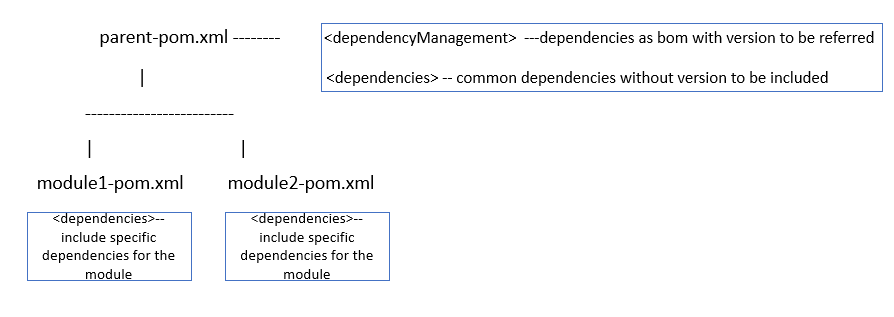
It makes sense to include bom files for external dependencies if they are made available. Even the internal dependencies can be created a bom project. In a multi module project, the best strategy would be to declare what all versions can be used in the <dependencyManagement> section of the parent-pom. This is just the declaration and it will not pull the dependencies in your project. To pull the common dependencies define them into your parent-pom under dependencies section. Lastly, whatever are the specific dependencies only applicable to your modules should be declared in your module/project’s pom. A quick illustration :
Simplifying Continuous Deployment : Exploring popular CD Tools and practical applications

Ansible, Chef, Puppet, Terraform, Cloud Vendor Templates, Pulumi what works for you ?

With the advent of cloud computing and DevOps CI/CD concepts, the whole ecosystem of application deployment has changed. The deployment space now involves quite identifiable tasks like., packaging the code(build the binaries), managing environment configurations (both infra. and app) , building the infrastructure, building application images and then final deployment on clusters.

The infrastructure machines have moved from very fine curated servers to serverless compute VMs. With that the deployment process has also shifted. It has changed from providing very customized deployment instructions to using repeatable automated deployment tools and code ( Yes, I am referring to IaC).

There are lot of mature products addressing this space. Each one of them are capable of managing the end to end deployment process on their own. But the problem is figuring out what works best for your use case and your application. You will find lot of information comparing tools like., Ansible to Chef then to Puppet, Terraform , ARM templates, Pulumi to name a few. On top of it each organization, project even architect will have their affinity to these products. The more I read the more confused I was to pick what works for the use case. This blog tries to simplify given the scenario which set of tool is best placed to solve your problem statement.

Questions to guide the decision-making

When we are analyzing the whole build and deploy space, actually we look to resolve following queries :

  • How do I package the application so that it doesn’t need to be rebuilt based on environment config and infrastructure changes.
  • How do I provision the platform, VM or cloud services which are replicable in each environment.
  • How do I decouple application deployment from the infra provisioning, each one should have their own lifecycle and not interdependent.

Tool categories to address the questions

Let’s check what deployment tools we have.

CategoryDescriptionExamples
Provisioners Family of products/tools responsible to create infrastructure from zero.Tools like Terraform and AWS CloudFormation.
Configurer or App ManagersProducts that help you manage the infrastructure created and support application configurations.Tools like Ansible, Puppet, and Chef.
PackagersLanguage-specific tools to bundle code into a manageable deployment unit. Containerization solutions fall in this category.Tools like Docker, Kubernetes, and language-specific package managers.

Based on your application nature, a combination of tools from above categories should come together to manage the deployment automation needs. In case we have to create new infrastructure or platform for the first time or replicate in all envs. we should use something from the provisioners. We should lean towards the App Configurer and Managers when we want the codebase deployed with a few configurations tweaked per environment. We can also use them when the app is deployed in an incremental fashion. When you want to package the code in such a that they are agnostic to underlying hardware then pick something from the Packagers.

CD Pipeline: Tool Suitability and Usage

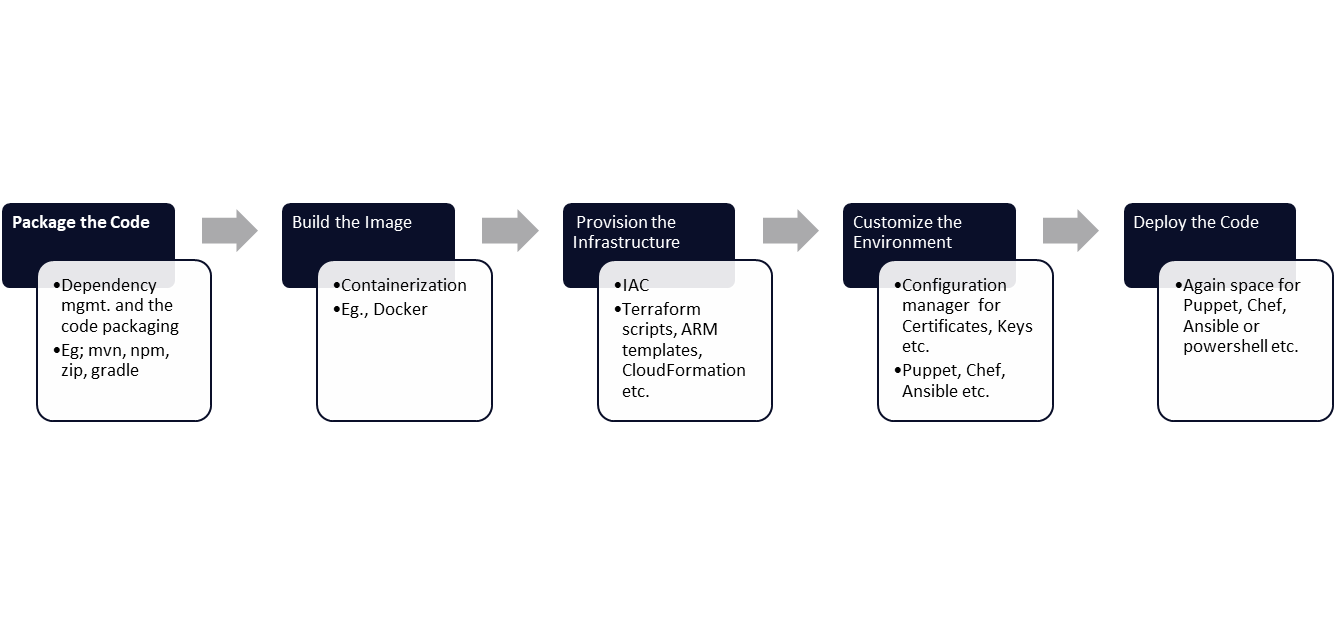
Ideally the pipeline should have following steps

This article focuses on the provision and configuration steps as the boundaries are blur here and the options available here mostly overlap. Its pretty hard to choose practical thing. Just for brevity sake, not focusing much on the other steps.

The “provisioners” are best suited to create the repeatable infrastructure. The are mostly declarative i.e. you only mention the desired state and leave it to them to figure out to attain it. The key point here is that we want to provision the infrastructure in immutable way. This means if we need to change something it doesn’t alter the state, it will figure out what needs to be done to reach the changed state. This concept makes IaC code simple as we don’t have to manage the changes based on current state in the code. For example ,

Here is a simple terraform script managing a spark cluster(GCP Dataproc) and the same script can be edited to change the base image without worrying what is the current state : :

provider "google" {
project = "<projectId>"
region = "<Var1>"
}

resource "google_dataproc_cluster" "<Var2>" {
name = "<Var2>"
region = "<Var3>"

cluster_config {
master_config {
num_instances = 1
machine_type = "n1-standard-4"
}

# Worker node configuration
worker_config {
num_instances = 2
machine_type = "n1-standard-4"
}

software_config {
image_version = "<configure image name>"

}

Also one thing to notice is that these are pretty standard tasks like., creation of DB, Databricks clusters, setting up N/W, Kubernetes cluster deploying image on a VM. The nuances are mostly driven by the cloud provider. Application team doesn’t change much than putting right values in the creation templates. It makes sense to let the IaC tool manage the state. Let it determine how to reach the desired state. Tools like Terraform, Pulumi or public cloud ones like., ARM templates, CloudFormation etc works well here.

Now lets discuss the next thing i.e. infrastructure configuration. This means customizing the the provisioned infrastructure as per your need. This is on top of providing the customized values in the provisioning templates. Few examples are like installing certain dependencies on the VMs, allowing certain ports only, setting up keys and certificates, pushing some init scripts for the cluster startup. Sometimes this can be achieved by inbuilding into the container image itself. Though this should be used more for the application configuration. Now this is very much specific to the organization and the project. Some project use the same cluster provisioning with different init script. Also this step will undergo lot of updates and incremental development. This will also involve lot of scheduled patching work like, change the security scan script etc. etc. Here the goal is to maintain the desired state of the platform, provided that the base state is known, hence the “Maintainers”. You need to tell exactly how it needs to be done like., fetch password from some vault and then install in certain directory or connect to some nexus location and copy initial dependencies. This needs scripting support. The tools which best support this step are Ansible, Puppet, Chef or even Powershell scripts. We wont go into nitty gritty on how to pick one among them like one is agent less, or use DSL language or YML or simple extension of shell scripts. But the point is pick tool here where you can exactly tell how it needs to be done and you got lot of control on code. If we pick any of provisioners here, we will end up creating lot of complex scripts or we will try to invoke the puppet modules or shell scripts from the provisioner (eg. terraform etc.). We should avoid such interlinking and let CI pipeline, gitlab or jenkins mange it. Yes it creates one problem that is how to link the output state of the provisioners and channel it as input for the configuration scripts in an automated way(may be another blog for it).. Here is an example of puppet script to configure init script execution for a VM. The same can be done from terraform but the whole flow of downloading script from nexus and pushing it here makes it easier.


# Init script path
$init_script_url = '<path>/<initVm>.sh'

# Download the initialization script to a temporary location
exec { 'download_init_script':
command => "/usr/bin/wget -O /tmp/initVm.sh ${init_script_url}",
path => '/usr/bin',
creates => '/tmp/initVm.sh',
}

# Execute the initialization script
exec { 'execute_init_script':
command => '/tmp/initVm.sh',
path => '/bin:/usr/bin:/usr/local/bin',
require => File['/tmp/initVm.sh'],
}

After bringing the infrastructure to the ready state lets deploy and configure the application. From a deployment perspective, our focus should be on managing environment-related properties. Other types of configurations should be managed in the build phase or the containerization phase. Few examples here would be notification email setting, timeout settings, DB url, etc. All these should come from Cloud Vaults, secret managers or configMap. All solutions like HELM Charts are applicable here only. There is not much difference between application and infrastructure configuration process. Its only at what level they are applicable. Hence same set of processes and IAC tool like., Ansible, Puppet, Powershell script, cloud specific configuration managers, Chef etc. works best here. Not picking specific example here.

For more clarity lets go through some practical scenarios :

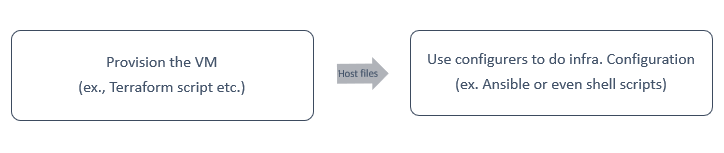
  1. We have to deploy some Java application on a cloud VM. The VM must have the organization-approved OS image. Then, the VM should have a few utilities and a certificate installed.
    • Here you can have provisioner IaC code to create VM with image and then use configurer file to deploy the certificate file. To link between VM name created by provisioner to configurator we can use a host file/infra file.
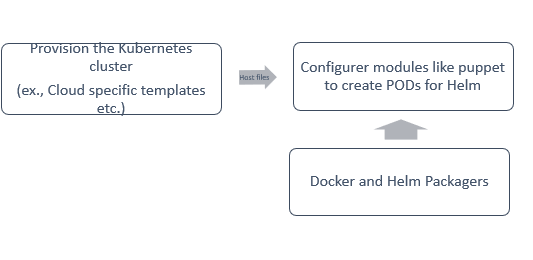
  2. You have to provision a kubernetes cluster and create namespace. HELM is provided to you. You need to configure the PODs, gateway and then deploy the HELM chart. Few secrets needs to be pushed to the cloud vault.
    • Again create cluster, namespace and configure initializer script using provisioners and for remaining tasks use puppet/ansible.
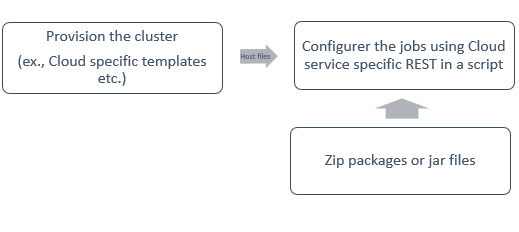
  3. You need to create a dataproc, databricks, or spark cluster. Pre define some dependencies. Then deploy your Spark jobs.
    • You can use scripts to integrate with the Cloud Service REST Apis after provisioning the cluster.
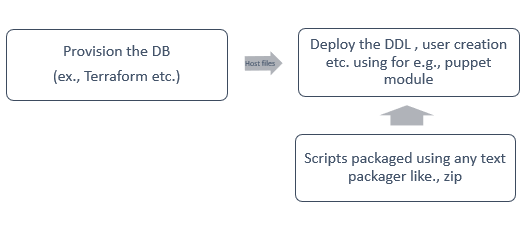
  4. Database or Sqlwarehouse deployments with DDL scripts and user permission settings.
    • We can see clear demarcation. Treat DDL scripts as code and deploy it separately. Only DB config should be managed using terraform etc.

Concluding Remarks

Its fair to say that with the gradual shift from very much curated hardware to easily replaceable infrastructure and different level of application packages (jar, zip, to serverless modules), we need a combination of deployment tools to work in tandem. Its not going to be a single tool but a combination of them aligning to each step involved in the deployment(infra deployment, app deployment, environment configuration etc.) and its very low dividend to dwell deep into comparison among tools addressing each deployment step. You will be fine with whatever is mandated by your organization in each category.