Building Applications with LLM Models: A Comprehensive Guide for Developers — Part 2

Part 1 focuses on the setting the context. This article explains the code and developer tasks in detail.

Introduction

Hopefully we now have enough understanding on key GenAI and LLM concepts. We also discussed on various Gen AI LLM models and key questions for app developers to ponder on. Let’s start discussing those questions.

Development framework options

All major GenAI or LLM API providers, such as Azure, Google, and OpenAI, offer libraries that allow developers to connect to their model APIs, configure them, provide context, and more, across various programming languages. This is similar to how noSQL vendors provide binaries to perform operations. However, as a developer, you need a framework that handles much of the boilerplate code for you, manages configurations easily, and integrates seamlessly into your larger application development ecosystem.

LangChain is a widely used framework that supports various programming languages for LLM-based application development. Another one that I prefer is SpringAI. If you are a Java developer, you’ll enjoy the familiar ecosystem that SpringAI offers, as it is equivalent to SpringData.

While there are other options available, it’s best to choose a framework that easily integrates with your existing application ecosystem.

Once the framework question is settled, lets dwell more into the app development.

Building the application : Key Steps

Just a teaser: when you develop your own application using Model APIs and integrate them with other application services, it can eventually lead to the creation of automated agents. These agents can chain multiple calls to the LLM models or trigger workflows based on model responses. I believe that’s where the real fun begins—truly integrated agents with GenAI. That’s where true potential will be realized.

Coming back to key steps with Spring AI as an implementation framework,

  • Create and configure a client to connect to Model APIs.

We need an API, or a client which based on the configuration properties connect to the model apis. This client becomes the one stop interface in the application to interact with the model. Perfect analogy would be SparkSession from the bigData world.

SpringAI provides ChatClient with fluent api to create prompts(input for model), advisors, functions and response handlers. As mentioned this becomes the one stop interface. It uses ChatModel which is either autoconfigured or programmatically created based on model properties defined in yaml file.

Some code samples to explain it better :

##There can be lot many configurations
spring:
main:
web-application-type: none
ai:
openai:
api-key: ${OPENAI_API_KEY}
chat:
options:
model: gpt-4o-mini
//autoconfigured chatClient with fluent api response
ChatClient.Builder builder = context.getBean(ChatClient.Builder.class);

ChatClient chatClient = builder.build();
String response = chatClient.prompt().user("Can you respond as a test ping").call().content();
  • The prompt creation — user query to the model

Prompts are the user queries or inputs for AI model to process and generate the desired output. The LLM AI models works with string input and output data types. Its for programmer to represent the input and output in structured objects but for AI models its string in and string out. Prompt engineering is a very important discipline in GenAI space. A well designed prompt can make a difference from an irrelevant response to well authored context aware content.

The prompt json schema for gpt ai model looks something like this :

{
"model": "string",
"messages": [
{
"role": "string",
"content": "string"
}
],
"temperature": "number",
"max_tokens": "number",
"top_p": "number",
"frequency_penalty": "number",
"presence_penalty": "number",
"stop": ["string"]
}

Spring AI provides Prompt class which provides convenient way to create json with above schema. Spring AI Prompt message-content can be created from a template string. Programmers will be able to relate it to parameterized queries. Prompt and ChatClient fluent apis makes it readable to setup all these input arguments. Most of the parameters are easy to understand. “Temperature” here controls the degree of randomness, lower the value more deterministic the ouptut is. “Role” is to define who is sending the prompt like., user, system or assistant. “top_p” controls the probability and diversity of the response.

  • The prompt and context fine tuning — ability to advise the Model

So far we have discussed patterns where the GenAI model are more or less treated as a black box. ChatClient calls apis with prompts with few response tuning parameters and accept what the model produces. As a developer, we want ability fine tune or influence the generated output as per our needs. There are few limitations with LLM models which make it mandatory. LLM have limited support when it comes to managing long running content and previous history, hard facts , data freshness ,and context-awareness. Let’s discuss various options available to advise the model to influence the response.

How to fine tune the model

The simplest option is passing the “context” with the prompt. The SpringAI ChatClient provides a fluent API to set the context, which is useful for providing background information or an initial narrative. It’s like giving a hint when you execute the query. For example, for a prompt like “Explain LLM model,” you can set the context as “LLM models are useful in summarizing text. Researchers struggle to summarize research papers.” This is equivalent to the “context” element in the GPT schema.

Contexts are good for setting up the baseline or ground level. For the next level of customization, if you want the response to be in a specific tone or include additional content, you can use the SpringAI “Advisors” API, which implements the RAG technique to enrich the user input. This maps to the “message” and “context” sections of the GPT JSON API. For example, you can add advice like “generate the response in a FAQ form” as one type of customization.

To further customize the model, you can incorporate information from your database or documents that the LLM model hasn’t been trained on. LLM models are typically trained on data up to a certain cutoff date, so it’s sometimes necessary to pass on the latest information. RAG (Retrieval-Augmented Generation) is the technique to “stuff the prompt” with contextual, relevant, unseen, and specific instructions to generate the desired response, overcoming the LLM model’s token size and context history limitations. SpringAI provides various Advisor implementations to implement the RAG technique and also supports VectorDB implementations as a data store for RAG. You can read all your documents, tokenize them, and store them in VectorDB. This can then be queried to pass on the most relevant information while invoking a prompt execution.

For example, if you have a document of internal assessments of various clients, you can tokenize it and store it in VectorDB. When creating an advisor to be tagged along with the “prompt,” you can query the VectorDB to find the 2024 ratings and pass the response as “advice.”

This adds a lot of value as you can simply augment your information on the model’s training dataset and enable responses to be customized as per your context.

Sometimes, prompt stuffing via RAG may not be sufficient. For example, if you want to understand the weather condition of your location, the AI model needs to know your current location, its temperature, and the current time to respond better. One way to achieve this is by preparing all this data by calling various functions, creating a context, and passing it along with the prompt. However, this involves a lot of boilerplate and plumbing code.

SpringAI and model APIs provide the ability to register functions with the prompt call, which the GenAI algorithms invoke as and when required. It’s like registering callbacks and letting the frameworks stitch everything together for you. SpringAI “Tool Calling” APIs support this, which is equivalent to {"role": "function", "name": "getDate", "parameters": {}} in the GPT JSON input.

I want to emphasize that SpringAI or equivalent frameworks make it easy to read and manage the code. Without these frameworks, someone would have to write all the code to prepare a fully functional GPT prompt response.

One last option but on the model side. What if you can fine tune the model itself. You can have the base model provided and tune it with customized training data which applies across all the usecases. All cloud AI services provide capability to fine tune the model. This makes sense when you want to handle certain customizations across the board for everyone.

  • Final steps– testing and deployment

We are very familiar with writing unit , integration and end to end tests. The problem is how to test the model output. Each time the model response will be a bit different from the earlier run even with the same input and parameter. Irony is all such responses are quite accurate and acceptable. Simple expected compared to actual data comparison may not work.

But we can test following things in the response :

  • Relevancy, tone and context alignment : The suggested way to do it is to run the same input with another model and then compare both responses on various parameters using a prompt to compare the two responses. This is using AI to evaluate. For example., you can create a prompt “Please compare both the responses on how relevant they are to the Software Engineering context and share response in a json ” or a prompt “Is this text in a friendly tone. Please response in binary terms.”
  • Fact checking : Sometimes the response is quite factual. Like., “India won the finals”. It becomes easy to test when there are facts in the response.

Spring AI provides Evaluators to support the model evaluation process.

Its easy to notice that these are very much standard applications. You can deploy them just like any other application. But you have decision to make where do you want the model to be deployed and be in action. Models execution requires high end GPUs or good RAM size. Most of the models are require good disk size to store the model datasets. As earlier mentioned that models are available as cloud services but there is an option to deploy the models on-prem as well.

Ollama, is open source tool to deploy the LLM models locally. This option works when you are concerned about data privacy and security and also serves well to provide a container feel and try out various models which have Ollama integration.

By using Ollama for model deployment, you achieve the same benefits that Docker provides for application deployment: consistency, portability, isolation, ease of deployment, and scalability.

Conclusion

It nay be challenging to grasp the internal working and training of the GenAI models. But as a developer, you can build application using their services in fairly standard way. I believe the natural progression is building of agents which seemlessly integrate GenAI with application services.

Building Applications with LLM Models: A Comprehensive Guide for Developers — Part 1

GenAI 101 and Building an Application Ecosystem Around Generative AI

Part 2 of the series details out developer tasks. Hopefully will introduce one more part to discuss in the GenAI model concepts in detail.

Introduction

The field of text analytics and language processing has evolved significantly with the general availability of Generative AI (GenAI) powered by Large Language Models (LLMs) on Transformer architecture. While NLP and text analytics have a long history, the introduction of the ‘attention’ mechanism in Transformer models, their ability to link multiple statements together to generate longer responses, and their parallel processing capabilities have made them highly impactful.

There’s a ton of articles out there about how these LLM models work and what you can do with them. Most of them either dive deep into AI math with things like embedded vectors or they focus on how to write ‘prompts’ for the AI model. But one thing that often gets overlooked is what developers need to build solid and structured applications around these models. Remember when NoSQL databases first came out? After a while, developers stopped worrying so much about how they worked and focused more on how to use them to solve their problems.

This article addresses the developer perspective on GenAI. Part 2 of the series will focus more on building the applications. This one focuses on preparing the ground. The terms are defined in brief just to keep length in check.

Gen AI and LLM — Hello World Introduction

LLM, Large Language Models is a AI model, typically function or algorithm with billions of parameters. They use the concept of embedding models and neural networks (deep learning) to create a mathematical model of each language world and based on a training data prepare a AI model to predict what is the most suitable word or text for a given input.

They are large as they have billion of parameters like., 1.5B, 7B, 8B, 14B, 32B, 70B etc. various sizes of the models. They are trained of huge amount of data all over the internet and works on a principle of “self supervised learning”. No one has to give what is the output for a given input to train itself, it uses the text available all over to figure out what is the relevant text.

The model to find relationship and predict what’s next word and sentence is where hard core ML engineers excel. This is core of GenAI systems. It is the base for GenAI like., what Lucene text indexing is for ElasticSearch.

There are really good articles to focus on how does it work. Right now let’s just move on with the baseline that we have a complex algorithm developed using multi layer learning technique and huge dataset which is good at predicting what should be the next word, sentence or paragraph.

The next key concept is Transformers.

Transformer architecture is what which makes the difference. As mentioned text predicting and language modelling has been there for sometime. What machines were not able to do well to interconnect multiple lines or figure out context to tune the recommendation. As humans, we focus on key words, tone, underlying theme to process the information. Google research paper, “Attention is all you need“, highlighted this and created a new architecture called Transformer Model to develop the LLM. Transformers use self-attention mechanisms to process and generate sequences, allowing them to capture context and dependencies better than previous models.

The Transformer’s parallel simultaneous processing mechanism computes relationships between all words in a sentence at the same time, rather than sequentially which makes them faster.

Having established this, let’s move on to next fundamental term i.e. GenAI.

GenAI is an AI system capable of generating new text, images, videos, audio, etc., using various AI models (like LLMs for text) with the ability to interpret input context. It includes not just text models but also other multimodal models like audio, video, and images. As a system, it addresses challenges around maintaining long-running context and client integration APIs. The term to focus on is that it is a system which works on LLMs and equivalent models to generate new content while integrating with other information sources for better context management.

Remember the analogy: Elasticsearch to Lucene.

Being a Software Developer — Getting started and what to do

With the buzz around ChatGPT, Gemini, Copilot, HuggingFace, Ollama, and other GenAI models, I feel as a software developer that we’re in a similar situation as when NoSQL databases changed the storage landscape. While I grasped the use cases and high-level architecture, what mattered most was understanding how to build applications around them and integrate them into my application landscape.

Similarly, today I understand how these AI models work and their practical use cases. But there are still questions on how to integrate them into my application ecosystem. This blog addresses such questions, including:

  • What are the available LLM model options?
  • What hardware is needed to deploy them?
  • Are there only cloud-based model services, or can they be deployed on-premises?
  • What frameworks and APIs are available to integrate these systems?
  • Can the models be customized?
  • How do you provide context information or new facts to fine-tune the results?
  • How can automated integration be done to fetch information from other systems and let the model use it?
  • How do you integrate model responses into an application flow to build automated processes?
  • How do you configure the model engine to control token length, cost, etc.?
  • Is caching applicable, and what are the optimization techniques?
  • How do you format the output in a structured entity for better integration?
  • And last but not least, how do you test and observe model operations?

I believe this should look familiar. Barring new different usecases, it resembles exactly all that a developer has to manage for an application probably with database as a backend. By no means I want to trivialize the challenges but the attempt is to simplify things with an analogy with what a developer do day in and day out.

I find it convenient to share examples or code snippets with Spring AI. This is just from illustration purposes. Let’s quickly address these questions.

Exploring Various LLM Models and Other AI Models

The whole GenAI model space is full of options. First categorization would be on the basis on the use cases they solve. The idea is not to classify them based on the implementation pattern or architecture but more from user perspective.

CategoryTraining dataset typeArchitectureDescriptionExamples
Text GeneratorsHuge text datasets; data over internetTransformerLLM models; accepts input as text or forms which provides text and generates text mostly or audio content.
Basically trained on text datasets.
LLama, GPT3, GPT4, LaMDA
Image GeneratorsImage datasets with their metadataGenerative Adversarial Networks (GANs), other also applicableSpecialized in image generation; trained on image datasetsDALL-E 2 –Open AI, Midjourney
Audio GeneratorsMusic data, audioGANs, transformers, hybridVarious music generation usecasesGPT-4o audio:,
Azure Open AI Text to Speech
Multimodal GeneratorsVarious dataset pairsTransformerscan work on different input and output data modesGemini

Video generators follow near about same approach as audio ones with different training dataset.

Another angle to look at them is their problem domain specialization. Some models are trained and developed to solve a very specific business case, such as GitLab Duo for coding and OpenAI Codex.

Another important parameter for classifying these models is their size and hardware requirements. Based on size, i.e., the number of parameters in the models, they can be classified as SLM (Small Language Model) or LLM (Large Language Model). Specialized models are generally SLMs, which have low latency and require less hardware. On the flip side, they can’t manage a wide range of use cases. For example, Codestral from Mistra AI is a code generation SLM model.

One last criterion, very critical from a privacy perspective, is the deployment model for the models. Most models have a cloud-based service offering, such as Google Vertex AI or Azure Open AI, but there are options for deploying models on your hardware/infrastructure. Ollama is a solution for running a few supported LLM models locally as well. The deployment strategy is a critical decision-maker based on data privacy constraints. We will discuss more on Ollama later.

It must be evident that there are various criteria’s along with cost and the model response evaluation to figure out what model or solution will work in your use case.

Point to note: ChatGPT, Gemini, and Copilot are applications using one or more of these models. As an application developer, the same can be achieved. Just think of having various data connectors in an application and, based on the scenario, a factory class provides you with the right connector.

The blog started with LLM models, and to have a consistent example set, we will continue with that only. Let’s discuss in the

Conclusion

Having gone through the concepts in brief and listing down the key developer concerns lets discuss the developer tasks in detail here (part 2).

Parent POM and BOM: Simplifying Dependency Management and Version Conflict Resolution

This blog addresses the options available to better manage the conflicting dependency versions and discuss a standard and consistent way to manage the dependencies using maven. Basic maven knowledge is assumed.

Problem Statement

Developers usually face lot of problems to resolve the dependency version conflicts. Maven has became the goto tool to handle dependencies management for java applications. It is very easy to declare the dependencies with specific version in Maven POM files.

But even after that conflict resolution specially in case of transitive dependency can be quite complex. In large projects, it is important to centrally manage and reuse the most relevant dependency versions. This approach ensures sub projects don’t face the same challenges. Let’s first briefly understand how maven resolves versions.

How Maven resolves dependency versions

Dependencies can be declared in a direct way or a transitive way. When maven loads all the relevant dependencies with correct version it draws a tree of direct and transitive dependencies.

In this image the first level are all the direct dependencies occurring in the order declared in the pom.xml. The next level is a simple view of couple of dependencies referred by 1st level dependency.

Maven works on the principle of short path and first come called as “Nearest Definition” or “Dependency Mediation” to resolve the conflicting version. In this example the dependencies nearest to the root will be picked. This is the breadth first traversal of a tree. In the image, the highlighted ones will be picked. You can observe that potential version conflicts will happen for the slf4j-api version.

As the project grows and adds lots of transitive dependency one has to painstakingly put up the correct versions in the pom. To resolve issues, you need to define it in pom explicitly or exclude from some entries. There are many ways to define the version in the pom but what is desired is a standard and centralized way to manage the dependencies so that it can be reused.

This is more evident in a multi module project or multiple applications related to single group where you want to manage with consistent dependencies version.

Possible Solutions

There may be various ways to solve this problem but I consider following two options as the most simple and relevant one. Both the options enable reusability by the age old principle i.e. inherit or include (composition).

Manage dependencies in Parent pom

Maven allows project / submodules pom file to inherit the parent pom defined at the root level. Its possible to have external dependencies’ pom as the parent pom as well.

Example; Here is a parent-pom which is declaring dependencies for spring-data, spring-security in dependencyManagement (as a reference) and spring-core to be included. Please notice the difference between dependencyManagement tag and dependencies tag. When you use the DependencyManagement tag you are just creating a reference while the dependencies is for actually importing.

Parent-pom
<groupId>com.demo</groupId>
<artifactId>parent-pom</artifactId>
<version>1.0.0</version>
<packaging>pom</packaging>

<dependencyManagement>
<dependencies>
<dependency>
<groupId>org.springframework</groupId>
<artifactId>spring-core</artifactId>
<version>5.3.25</version>
</dependency>
<dependency>
<groupId>org.springframework.data</groupId>
<artifactId>spring-data-jpa</artifactId>
<version>2.7.10</version>
</dependency>
<dependency>
<groupId>org.springframework.security</groupId>
<artifactId>spring-security-core</artifactId>
<version>5.8.8</version>
</dependency>
</dependencies>
</dependencyManagement>
<dependencies>
<dependency>
<groupId>org.springframework</groupId>
<artifactId>spring-core</artifactId>
</dependency>

</dependencies>

project's pom inheriting the parent-pom

<parent>
<groupId>com.demo</groupId>
<artifactId>parent-pom</artifactId>
<version>1.0.0</version>
</parent>
<artifactId>demo</artifactId>
<dependencies>
<dependency>
<groupId>org.springframework.data</groupId>
<artifactId>spring-data-jpa</artifactId>
</dependency>
</dependencies>

Developers can define dependencies with the correct version or just define the version as a variable in the parent pom file. The sub modules or sub projects can override them in their project specific pom file. Yes the “Nearest definition” applies and the child pom entries will override the parent pom’s entries.

This for sure solves the problem but just like a single inheritance you can only define a single parent pom file. Your project can’t refer to multiple pom files per concrete dependency set like., one for Spring, one for DB drivers etc. This impacts when you want to inherit multiple internal pom files. Just imagine you have inherited from springboot as a parent.

<parent>
<groupId>org.springframework.boot</groupId>
<artifactId>spring-boot-starter-parent</artifactId>
<version>2.0.2.RELEASE</version>

</parent>

Parent-pom approach solves the problem but at cost of readability. You may end up having a bulky parent pom file with a long list of dependencies or variables defined. Also someone has to very carefully sort out version clashes although in a single file or central place.

Another option is to have a modularize approach enabled by the BOM (Bill of Materials) files.

BOM — Bill of Materials

BOM is a special kind of POM file only which are created for the sole purpose of centrally managing the dependencies and their version with the aim to modularize the dependencies into multiple units. BOM files are more like a lookup file. It doesn’t tell you what all dependencies you will need. It just sort out the versions of those dependencies as a unit.

Example like., bom of the spring rather than you solving all linked versions it will do it for you. Here we have included bom files of Spring boot and its dependencies, hibernate and rabbitMq. We didn’t declare all the jars in dependencyManagement. Again dependencyManagement plays the same role that it only declares and not include the dependencies.

--parent pom with bom files of spring, hibernate and rabbitMq   
<groupId>com.demo</groupId>
<artifactId>parent-pom</artifactId>
<version>1.0.0</version>
<packaging>pom</packaging>

<dependencyManagement>
<dependencies>
<dependency>
<groupId>org.springframework.boot</groupId>
<artifactId>spring-boot-dependencies</artifactId>
<version>2.7.10</version>
<type>pom</type>
<scope>import</scope>
</dependency>
<dependency>
<groupId>org.hibernate</groupId>
<artifactId>hibernate-bom</artifactId>
<version>5.6.15.Final</version>
<type>pom</type>
<scope>import</scope>
</dependency>
<dependency>
<groupId>com.rabbitmq</groupId>
<artifactId>amqp-client</artifactId>
<version>5.13.0</version>
<type>pom</type>
<scope>import</scope>
</dependency>
</dependencies>
</dependencyManagement>

Ofcourse you can override version in your project’s pom and again the nearest definition principle will apply. This brings lot of advantages. It allows you to inject multiple bom files in the project i.e., one for spring, one for internal projects etc. Developers can have organization specific parent pom inherited and external dependencies included as “Dependency Management”. This is moving to modular poms from monolithic ones. On top of it you can have multiple version of the bom file which allows fair bit of independence to move from one version to another without impacting others. It creates an abstraction for all transitive dependencies and you use them as a unit with assurance that under the hood all version conflicts have been resolved effectively.

It still doesn’t solve all the problems. You will still have version conflicts lets., say when you include multiple bom files and each referring to same jar but different version. Such issues should be very less now as inside a bom such issues are already taken care of. So issues will happen but probability is far less.

Concluding Remarks

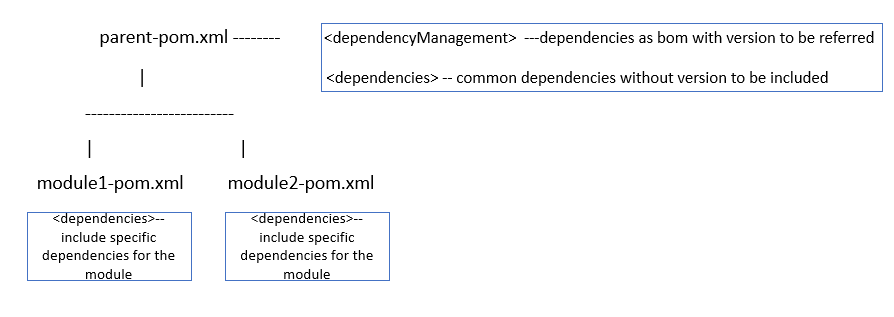
It makes sense to include bom files for external dependencies if they are made available. Even the internal dependencies can be created a bom project. In a multi module project, the best strategy would be to declare what all versions can be used in the <dependencyManagement> section of the parent-pom. This is just the declaration and it will not pull the dependencies in your project. To pull the common dependencies define them into your parent-pom under dependencies section. Lastly, whatever are the specific dependencies only applicable to your modules should be declared in your module/project’s pom. A quick illustration :